Prologue
One of the key features for the “GlueOps Platform” to work is installing a LoadBalancer, and because we’re using GlueKube to create kubernetes cluster in a cloud agnostic way, getting the LoadBalancer to work isn’t that easy, as each cloud providers requires different setup, especially for providers with no CCM or in an on-prem installation.
The Birth of the LoadBalancer in the Kingdom of Kubernetes
In the realm of cloud-native deployments, a Kubernetes LoadBalancer Service typically interacts with the underlying cloud provider’s infrastructure through a Cloud Controller Manager (CCM). When a Service of type LoadBalancer is declared, the CCM translates this request into a cloud-specific API call, provisioning a load balancer resource (e.g., an AWS ELB, a Google Cloud Load Balancer, or an Azure Load Balancer) in the respective cloud environment. This external load balancer then directs traffic to the Kubernetes worker nodes where the application pods are running.
However, this seamless integration is not universally available across all cloud providers or, more significantly, in on-premises deployments. For cloud providers without a dedicated CCM or for on-premise Kubernetes clusters, the LoadBalancer service type does not automatically provision an external load balancer. In these scenarios, the LoadBalancer service remains in a pending state, as there’s no native mechanism to allocate an external IP address and manage the load balancing infrastructure. This necessitates alternative solutions to expose applications to external traffic, as the automatic provisioning of an external load balancer, a key feature in CCM-enabled environments, is absent.
The Dark Ages: How We Once Faced the LoadBalancer Problem
During our research, we stumbled into two different ways to get the Loadbalancer working: LoxiLB and HAProxy.
Both require additional LoadBalancer to maintain but LoxiLB was easier to setup and maintain because it comes with a daemonset you apply that watch for any “loadBalancer service type” and then add it as a rule in the LoxiLB.
One of the main limitations we encountered is that the load balancer nodes are not managed as first-class Kubernetes resources. Kubernetes excels when it can declaratively manage the full lifecycle of infrastructure components—creation, updates, scaling, healing, and decommissioning. In this case, the load balancer nodes sit outside that control plane.
This has practical consequences:
Kubernetes cannot automatically reconcile drift if a load balancer node becomes unhealthy.
Node replacement, upgrades, or scaling require external tooling or manual intervention.
Standard Kubernetes patterns such as self-healing, rolling updates, and GitOps-driven reconciliation are not naturally applicable.
Because these load balancer nodes live outside Kubernetes lifecycle management, observability does not come for free. And the Last factor that raised concerns was the project’s commit and support history.
On the other side, we couldn’t find an updated operator to handle the “LoadBalancer service type” for HAProxy, so we decided to use NodePort instead with fixed ports values and then pass those values to the HAProxy configuration file like the following:
| |
This approach led us into an abyss of many sequential changes.
First we’re using external-dns to upsert platform DNS records, and because we’re no longer using LoadBalancer, then the Service and Ingress resources will not get an IP assigned.
To mitigate the above problem, we used external-dns annotation for the Service resource called: “external-dns.alpha.kubernetes.io/target”, we passed it the LoadBalancer’s public IP to register the upcoming DNS records with it.
| |
Now talking about the cons
First, for the current method to work we need to create a Lb(outside of Kubernetes), upgrading it when needed and making sure it’s healthy.
Second, because we’re installing Nginx ingress inside Kubernetes, we need to make sure every feature(like proxy protocol..) we’re using can be compatible with HAProxy.
While we didn’t choose this method, it taught us a lot more about kubernetes Service resource and how external-dns and nginx-ingress work interchangeably, also a small thing to tell, during our research we found a small bug in the pomerium ingress controller when we used the nodeport service type, here is a link to our PR:
The False Prophet: Why MetalLB Couldn’t Save the Realm
If you write “installing kubernetes on-prem”, you will find a bunch of articles talking about MetalLB and how it’s the go-to solution to your LB problem on-prem. But our case was quite different, we’re not just installing the cluster on-prem, we wanna do it on every node that you have ssh on, no matter the provider.
For MetalLB this isn’t the case, because MetalLB needs a control over the L3/L2 network layer to advertise the used IPs, and that isn’t possible for providers like AWS/GCP/AZURE…
The Glimpse Of Truth: Discovering The Light
We did another research and found a simpler approach , that goes like the following:
Upon bootstrapping the cluster, we label/taint the nodes where we want nginx-ingress to be scheduled on with use-as-lb=true. Then we save those node public IP’s for the next steps.
Now Inside the values.yaml for ingress-nginx we pass the labeled nodes public IP’s in externalIPs field
| |
Then we install nginx-ingress, and because “LoadBalancer” service externalIP is populated, the pending state will disappear and ingress resources will have the IPs assigned.
One small issue we noticed is, ArgoCD “LoadBalancer Service” healthcheck doesn’t consider service with externalIPs as healthy, so we added custom config:
| |
The Light: A Tailored Cloud Controller Manager
The externalIP approach was working great for us, until we heard about the ingress-nginx news, and we wanted to give our stack a test and switch to traefik, we thought the same behaviour will work just fine, but it didn’t.
It turned out that traefik controller doesn’t accept externalIP as a valid IP that will be assigned to its ingress, it only assigns whatever the service.status.loadbalancer.ingress have.
So I told the team, Let’s do it the kubernetes expected way, we will build a tailored CCM for our needs. The algorithm for the CCM is :
1- Watch for certain service with type: loadbalancer and label use-as-loadbalancer=platform | public.
2- Search for the healthy nodes with same labels
3- if nodes exist, we retrieve nodes PUBLIC/PRIVATE ips and save them on service.status.loadbalancer.ingress[].ip.
4- if you remove service label use-as-loadbalancer value, the controller will assume you don’t wanna consider it again, so it will remove the assigned IP and return it back to <pending>.
The controller will reconcile every 30s, so if one of the nodes goes not-ready/unhealthy, the controller will remove it in the next iteration.
Creating CCM from scratch is a pain, so my CTO(venkat) suggested using the metacontroller , the metacontroller will handle the watching part and invoke a webhook API every x seconds. So my objective is to build that API.
Here is an example of DecoratorController:
| |
And the webhook is a FastAPI application:
| |
The Curse of 1:1 NAT: A Cloud Provider’s Hidden Dilemma
At first, we tested the whole process in Hetzner, but it turns out AWS/GCP/AZURE have different networking models.
For instance if you deploy an EC2, have public IP(12.12.12.12) and you run ifconfig, you will see only the network interface for private IP, in contrary to other providers you can see both public and private IP, here screenshots for AWS and hetzner:
AWS: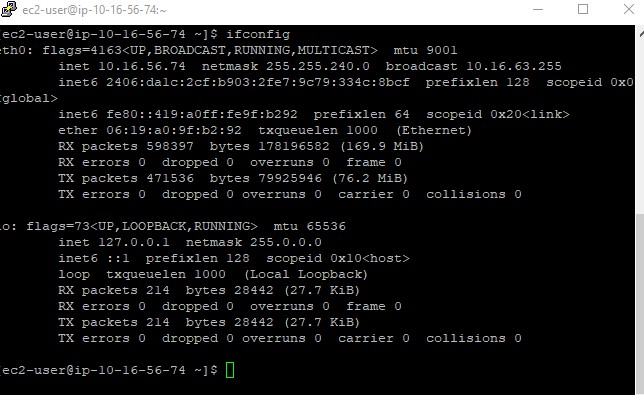
Hetzner: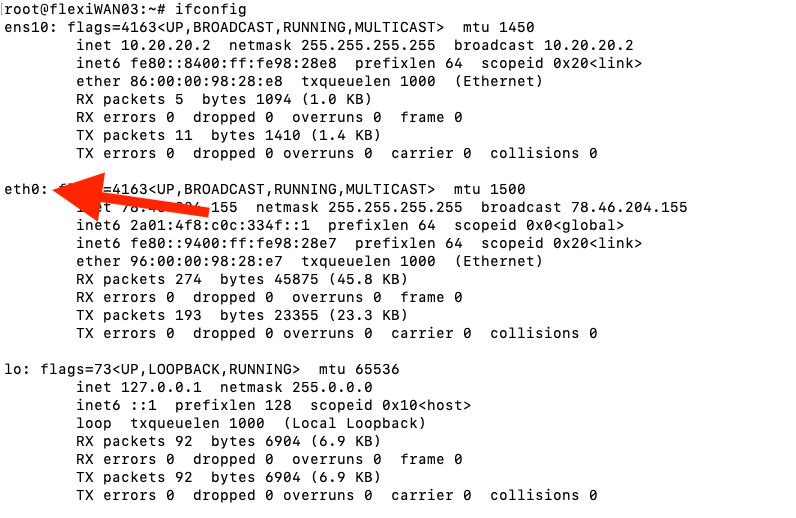
For AWS, when you send a request to the EC2 Public IP, internally a 1:1 NAT Gateway search for the private IP mapped to that public IP and route traffic to it. So why is this important?!
This is important because, if we deploy the same approach, kube-proxy internally will create an IPTable rule that matches requests directed to Public IP, but this will never happen as AWS will only send requests directed to private IP, so what’s the solution?!
We modify the CCM code to create another internal service with the same specs as the current controller’s service with small changes on externalIP pointed to node’s private IPs and type ClusterIP.
And here is the modified code for
| |
And that’s it, with that kube-proxy will create a route to match requests directed for that private IP’s.
Summary
Faced with the challenge of creating a cloud-agnostic Kubernetes LoadBalancer Service without a native Cloud Controller Manager (CCM),We explored several solutions.
Initial attempts, including LoxiLB, HAProxy + NodePort (manual external management), MetalLB (incompatible with major clouds lacking L2/L3 control), and ExternalIPs (limited ingress controller support), all failed to provide a robust, automated solution.
The ultimate fix was a custom, Metacontroller-based CCM named Gluekube-CCM. that relies on the installed ingress controller:
- Watches for specific
LoadBalancerServices. - Identifies labeled, healthy worker nodes (retrieving their public and private IPs).
- Updates the Service status with the node’s Public IPs (for external systems like external-dns).
- Creates a secondary ClusterIP Service using the node’s Private IPs in the
externalIPsfield. This step resolves the 1:1 NAT issue in clouds like AWS/GCP/Azure, ensuringkube-proxycorrectly routes traffic arriving at the node’s private interface.
This tailored CCM provides a consistent, reliable LoadBalancer experience across diverse environments.
Here are the Repo mentioned in the article:
GlueKube: https://github.com/GlueOps/GlueKube
Gluekube-CCM: https://github.com/GlueOps/GlueKube-CCM
Metacontroller: https://metacontroller.github.io/metacontroller/intro.html